
AI agents for restaurants: The complete guide
AI agents for restaurants come in different forms – some automate a task like taking bookings or answering the phone, others reason across your operational data to answer a question in plain English. This guide focuses on the second kind: software that pulls from your POS, labour, reviews, reservations, and inventory data to answer questions like why labour ran high on Tuesday, straight from the numbers – no report required.
That’s a meaningful shift from how most restaurant tech works today. This guide walks through the different types of AI agent for restaurants, how the data and insight kind differs from the BI dashboards most operators already use, the use cases getting genuine traction on multi-site teams right now, and how Tenzo’s MCP puts this to work in practice – with results from groups already running it across their sites. If you’re earlier in the journey, our guide to AI for restaurants covers the wider use cases first.
What is an AI agent for restaurants?
You’ll also see this called an AI assistant for restaurants – same idea, different phrasing.
Think about how a kitchen printer works. Tickets come through one at a time – table 12, then table 14, then a modification on table 9. It’s accurate, but it doesn’t tell you what’s already being made and what to prep next.
An AI agent works more like the person running the pass. They’re looking at the tickets, but they’re also cross-referencing stock with upcoming reservations and already sold dishes. They can tell you, without being asked twice, whether you will see out of an item later in the evening.
That’s the practical difference between a dashboard and an AI agent for restaurants. A dashboard shows you your data – at Tenzo this is real-time data. An AI agent then joins the data up and gives you an answer you can act on – in plain English, on demand, without you doing the cross-referencing yourself. That applies whether you’re asking about labour, inventory, reservations or whatever other data you have connected. The agent’s job is to hold all of it in view at once.
The different types of AI agent for restaurants
Not every AI agent for restaurants is doing the same job. Broadly, they fall into three categories:
- Front-of-house automation agents. These handle guest-facing tasks directly – answering the phone and taking orders, managing bookings and waitlists, or responding to messages across WhatsApp, Instagram, and SMS. Tools like SevenRooms sit here: the agent completes a specific customer-facing task instead of a person doing it manually.
- Back-of-house automation agents. These run operational processes in the background – reordering stock once it hits a threshold, logging fridge and freezer temperatures, flagging compliance checks. The agent executes a defined task on a trigger, with limited input from a person.
- Data and insight agents. These don’t take an action on your behalf. Instead, they reason across the data your other systems are already generating and hand you an answer or recommendation that you act on. This is where Tenzo’s MCP sits – it doesn’t answer your phones or reorder your stock; it connects your POS, labour, inventory, reviews, and reservations data so you can ask a question and get a grounded answer, in plain English, across all of it at once.
Everywhere this guide refers to an “AI agent”, it means this third kind – the data and insight type, not one that’s booking tables or picking up the phone.
How is an AI agent different from a dashboard or BI tool?
This comparison is between a dashboard and a data and insight agent like Tenzo’s MCP. Front-of-house and back-of-house automation agents aren’t really BI alternatives – they’re doing an entirely different job, closer to a member of staff than a reporting tool.
A dashboard is built to answer the questions you already knew to ask when you designed it. You define the report, and it shows up the same way every time – same columns, same chart, same cadence – whether or not that’s actually what you need today.
An AI agent flips that around. Instead of building a report and hunting through it for the number, you ask the question directly, in plain English, and it draws the answer from wherever it lives – joining sales, labour, and reviews data behind the scenes if that’s what the question needs.
| Dashboard / BI | AI agent (eg. Tenzo MCP) | |
| How you get an answer | Build or open a report | Ask a question |
| Data sources per answer | Usually one | Multiple, joined automatically |
| Format | Fixed – same every time | Shaped by the question you asked |
| Best suited to | Tracking known metrics reliably | Investigating something new |
Dashboards aren’t going anywhere – they’re still the right tool for tracking the metrics you check every single day. An AI agent is what you reach for when the question doesn’t fit neatly into an existing report. For a deeper look at where reporting ends and analysis actually begins, see our operator’s guide to AI restaurant analytics.
What can restaurateurs ask an AI agent?
Ask your data directly
The clearest use case is also the simplest one: asking a question and getting an answer, without building a report first. Tenzo co-founder and CEO Christian Mouysset demonstrated this live, asking the agent for a labour productivity analysis across sales, labour, and reviews for the last ninety days – visualised, with recommendations attached.
Within seconds, the agent – using Tenzo MCP – had pulled sales per labour hour, labour cost ratios, and review scores across every site, cross-referenced them, and flagged that two of the highest-revenue sites were among the least productive on labour – a pattern that wouldn’t surface on a standard labour report.
Forecasting and smarter preparation
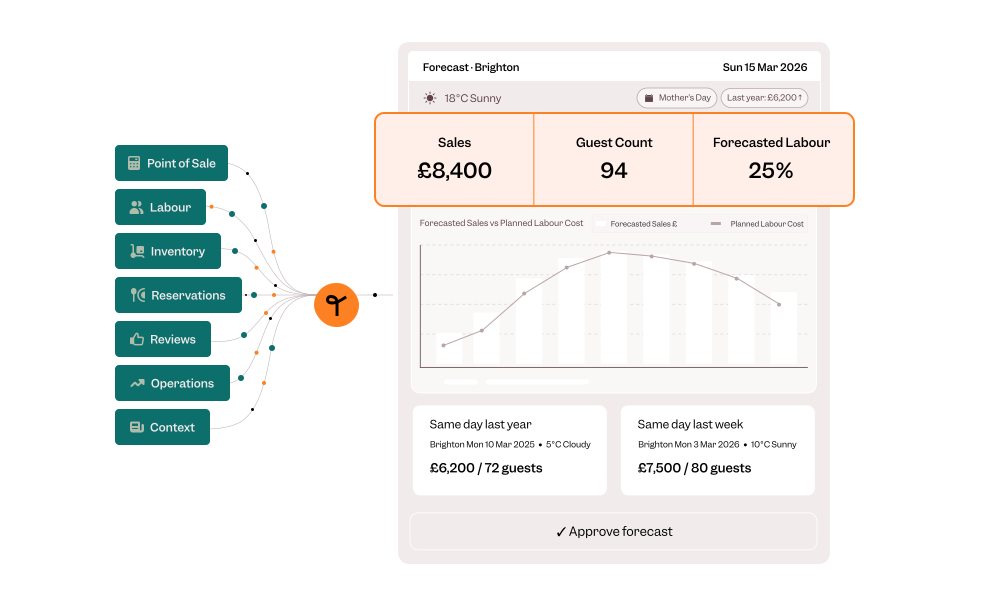
AI demand forecasting doesn’t just predict tomorrow’s covers; it changes how you prep for them. When a forecast accounts for weather, local events, and seasonality at an hourly level, prep lists and par levels can be set against what’s actually likely to happen, rather than last week’s average. That means less wasted stock and fewer items running out during the week.
How does Tenzo’s MCP work?
Most tools marketed as “AI agents” for restaurants are really a chat window sitting in front of one data source. Ask about labour, and it can only see labour. Ask it to connect that to reviews or covers, and it can’t – because it was never built to look at more than one source at once.
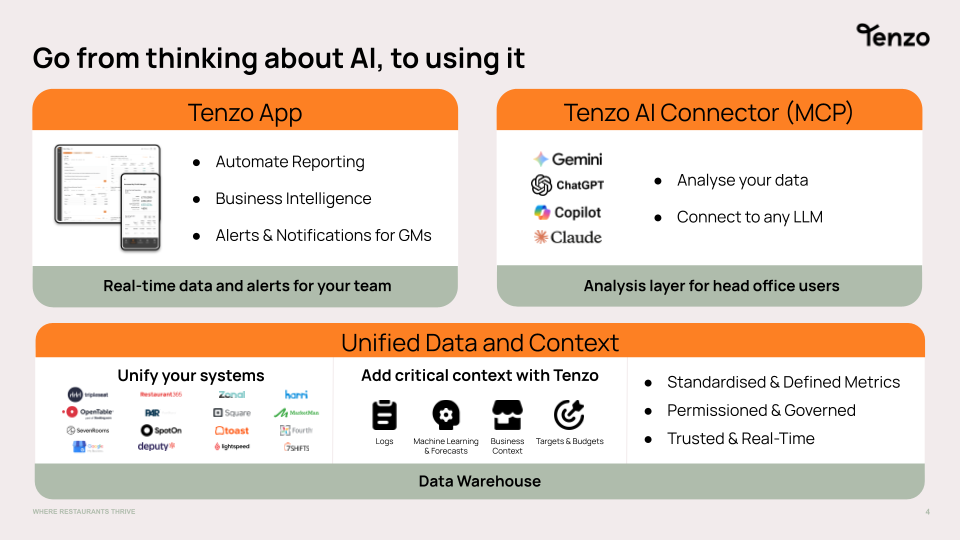
Tenzo’s MCP (Model Context Protocol) is built differently. It connects your entire tech stack – POS, labour, inventory, reviews, reservations, GM logs and more – into a single, unified data model. When you ask a question, the answer draws on all of the aggregated data simultaneously. Not just whichever slice happens to live in the tool you opened.
Tenzo’s AI agent (MCP) is a data and insight agent. It doesn’t act on your behalf the way a booking or ordering agent would – it answers questions grounded in your own data, and you decide what to do with the answer.
It also works inside the AI tools your team already uses. Connect it to Claude, ChatGPT, Gemini, or Copilot, and you’re asking your restaurant data questions in the same window you already use for everything else.
Two things make this an agent in the fuller sense, not just a chatbot with better plumbing behind it:
- It holds business context. You can load your own definitions, playbooks, and terminology. What you call a cover, how your sites are named, your opening hours – so it understands your business without re-explaining it in every prompt.
- It reasons across sources, not just within one. A generic AI agent can only answer from the data it’s been shown. Tenzo’s MCP queries every connected source at once, so a question like why reviews were lower on Fridays can genuinely draw on labour, covers, and sentiment together. This type of join is structurally impossible for a single-source tool.
Operators already using it are seeing this play out in different ways.
At Camino, a five-site tapas group, Finance Director Tyrone Delaney used it to keep labour and COGS under control without sacrificing guest experience. Labour that would have been expected to run at 36% last quarter instead came in at 31% – savings Tyrone puts in the hundreds of thousands of pounds – while food COGS moved from 28% to 25% of revenue.
At JKS Restaurants, a 20-site group operating across the UK and New York, Finance Director Christina had been using Tenzo for daily and weekly reporting for about a year before the MCP arrived. What changed wasn’t the data – it was who could get to it. Complex queries that used to take the FP&A team anywhere from a few hours to a week now take about an hour. What’s more, because anyone in the business can ask a question in plain language, insights that used to sit with one specialist now belong to the whole team.
At Public House Group, a nine-site business, consultant Tom Foulser used the MCP to investigate a 6% gross profit gap between two similar sites. In half an hour with Claude, he had a four-page breakdown of sales mix, wine-versus-spirits ratios, and pricing differences across both sites – a diagnosis projected to recover 3–4% in GP within two weeks.
Three different groups, three different problems – labour and COGS control, reporting accessibility, and margin diagnosis. All solved the same way: by asking a question and getting an answer that draws on everything connected to it.
How to get started with an AI agent?
- Connect your data sources. POS, labour, inventory, reviews, reservations, and GM logs all feed into one unified model.
- Load your business context. Definitions, playbooks, site names, and targets, so the AI understands your business from the first question.
- Ask questions in the AI tool you already use. Claude, ChatGPT, Gemini, or Copilot – no new interface to learn.

Ready to see this with your own data?
Book a demo and we’ll show you exactly what Tenzo’s MCP can surface – using your restaurant’s actual numbers.
FAQs
Frequently Asked Questions
AI agents for restaurants generally do one of two jobs: automating a task – answering the phone, taking a booking, reordering stock – or reasoning across your existing data to answer a question in plain English. Tenzo’s MCP is the second kind. It doesn’t take an action for you; it draws an answer from your data, whether that’s a single site or a whole group.
A dashboard will tell you labour ran at 34% last week. A data and insight agent will tell you why – that two sites ran agency cover on Saturday nights at more than double the usual rate, and it’s happened four weekends running. The dashboard shows the number; the agent explains it, and you can ask a follow-up.
In practice, most questions fall into two groups: direct questions about your own data (“why was labour high on Tuesday?”) and forecasting questions (“how many covers should I expect this Friday, and how does that change my prep?”). The common thread is that you’re asking in plain English rather than building or reading a report.
Generic AI agents for restaurants are usually built to automate one task – answering calls, taking bookings, reordering stock – within a single system. Tenzo’s MCP is a data and insight agent: it connects everything already happening across your tech stack into one model, holds your own business context, and works inside the AI tools you already use – Claude, ChatGPT, Gemini, or Copilot – so an answer can draw on all of it, not just one source.
Ready to explore an AI Agent for your restaurants?
The team are always happy to discuss how AI agents can help your specific business case.