
Power BI for restaurants: an honest assessment for operators

In this article

Talk to us
Wondering if Power BI is the right choice for you? We can help you on your journey.
Let's chatPower BI is a powerful business intelligence tool that restaurant operators increasingly consider when manual reporting becomes unsustainable. It can work well for groups with dedicated technical resource and a clean, uniform tech stack. For most multi-site restaurant operators without in-house data engineers, the setup complexity and lack of hospitality-specific context in business intelligence (BI) tools, make it a difficult fit, and purpose-built alternatives are worth evaluating before committing.
Manual reporting eventually breaks. When your operations team is spending more time downloading CSVs and building spreadsheets than acting on what they show, something has to change. Power BI is one of the tools restaurant operators most commonly consider at that point – but whether it’s actually the right fit depends heavily on your tech setup, team structure, and what you need the data to do. This article gives you an honest breakdown of both sides.
Why do restaurants consider Power BI?
Operators often look to Power BI for restaurants when manual reporting becomes too time-consuming and complex. If teams are spending more time compiling reports than acting on insights, you know the balance is wrong.
Many restaurant teams, especially operations, crave real-time insights, but data handling is often centralised in finance teams with different priorities. Think reconciliation rather than operational insight. A real-time dashboard bridges this gap, allowing both departments to access relevant data instantly.
Modern restaurant operators want to see sales trends, labour costs, and transaction volume fluctuations in the moment rather than waiting for end-of-week or end-of-month reports. For example, if labour costs are too high during lunch, immediate action can be taken rather than discovering the issue at the end of the week when it’s too late to adjust.
Additionally, restaurants operate multiple systems, making data integration essential. Comparing data from POS systems, inventory management, labour tools, and customer reviews can uncover inefficiencies. It’s no use having great COGS if customer ratings are decreasing because they feel short-changed. A BI tool should bring all this data together effortlessly to generate insight.
Is Power BI a good fit for your restaurant?
Power BI for restaurants can be beneficial, but it’s not the best fit for every business. Here are key factors to consider before implementing Power BI:
Power BI is a good fit if your restaurant has:
- A dedicated tech team: If you have in-house data engineers or software developers, they can manage API connections and data warehousing.
- A streamlined tech stack: A single system for each category across all locations simplifies integration and reporting. E.g. one POS system across all sites, one labour tool, etc.
- Minimal data sources: Connecting only a few data sources (e.g., sales and labour costs) makes setup easier.
- A uniform restaurant concept: Single or complementary concepts (e.g., all QSR or all fine dining) make standardising reports simpler.
- A small group of users: If only finance or a few team members need access, Power BI may be manageable.
Where Power BI commonly falls short for restaurant operators:
- You need real-time data: Power BI setups often struggle with real-time reporting, making it harder for general managers (GMs) to act on fresh insights.
- Your restaurant group has diverse concepts: Different reporting needs across multiple restaurant types can complicate Power BI implementation.
- You require high data granularity: Many visualisation projects start with broad scopes but lack the depth needed for operational decision-making.
- You want data accessibility for the whole team: Power BI can become expensive and complex if multiple departments need access.
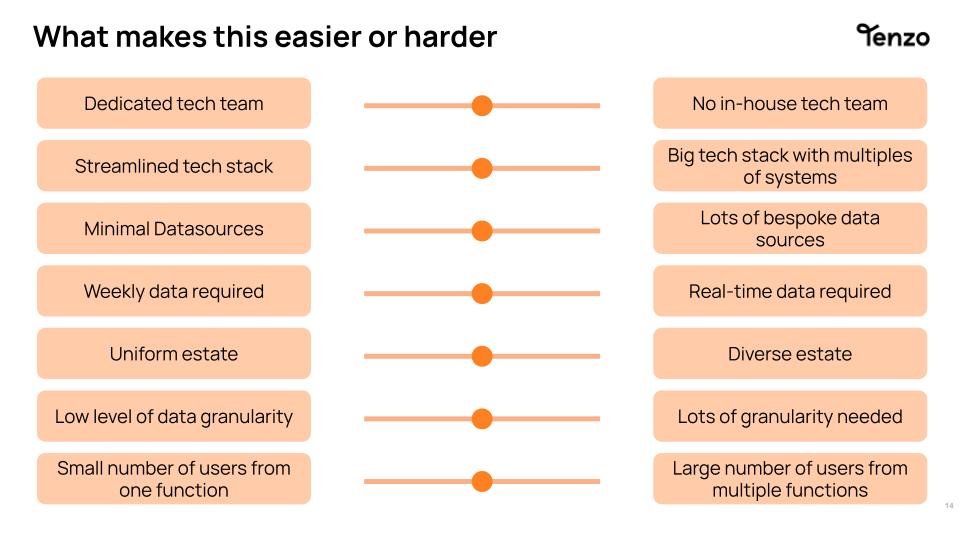
To determine if Power BI is right for your restaurant, assess where you fall on the sliders below. If you fall more on the left, then it might be the right choice for you. But, if you’re more on the right, then it would be worth looking at alternatives like Tenzo.
What does setting up Power BI for restaurants actually involve?
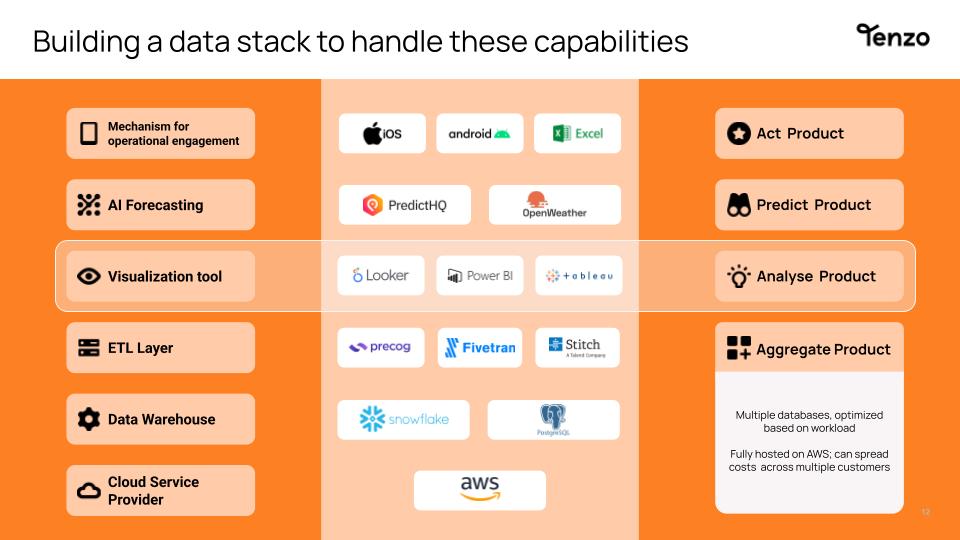
Implementing Power BI in restaurants requires more than just signing up for the software. You need the right infrastructure in place. We recently broke down all the steps needed to build your own reporting suite with visualisation tools, but here’s a simple breakdown:
- Cloud Infrastructure – Choose a cloud provider to ensure data is accessible from anywhere.
- Data Warehouse – Store large datasets efficiently for scalable reporting.
- Data Integration & ETL – Extract, transform, and load (ETL) data to Power BI from various sources.
- Visualization Tool – Power BI sits on top of this infrastructure, providing interactive reports.
Without this setup, Power BI may not deliver the seamless insights restaurant operators need.
Power BI vs purpose-built restaurant analytics: what’s the difference?
The setup breakdown above is the real difference. Power BI gives you a powerful visualisation layer, but it’s a layer – the cloud infrastructure, data warehouse, and ETL pipeline underneath it are a separate build, and for most restaurant groups that means either hiring data engineers or bringing in contractors to build and maintain it.
A purpose-built platform like Tenzo skips that layer entirely. It connects directly to your POS, labour, and inventory systems out of the box, with the hospitality-specific context already built in – sales per labour hour, actual vs theoretical usage, sales mix, the metrics operators actually act on rather than generic business metrics that need reworking for a restaurant context.
The practical difference shows up in time to insight. A Power BI implementation – infrastructure, integration, and dashboard build – typically takes months, and stalls if the person who built it leaves. Tenzo is built for restaurants specifically, so most groups are seeing insight within days, not months, without a data team on the payroll.
That doesn’t make Power BI the wrong choice for every group – if you’ve already got the technical resource and a clean, uniform tech stack (see the checklist above), it can work well. But for most multi-site restaurant operators, Tenzo handles the entire data pipeline so you’re not the one building and maintaining it.
Ready for more?
Frequently Asked Questions
Power BI is Microsoft’s business intelligence and data visualisation platform. Restaurants can use it to build custom dashboards from their operational data – POS, labour, inventory – but doing so requires a data warehouse, ETL pipeline, and technical resource to set up and maintain. It works well for large groups with dedicated data teams; for most operators, the setup overhead outweighs the benefit.
The main options fall into two categories. Generic BI platforms – Power BI, Tableau, and Looker – offer powerful data modelling capabilities but require significant technical setup and ongoing maintenance. Purpose-built restaurant analytics platforms – like Tenzo – connect directly to hospitality-specific systems and provide operational reporting out of the box, without needing a data team.
The Power BI licence itself starts at around £8.40 per user per month, but the true cost of implementation is much higher. Building the cloud infrastructure, data warehouse, and ETL pipeline needed to make Power BI work with restaurant systems typically requires developer resource – either in-house or contracted – adding significant setup and maintenance cost that most restaurant operators don’t factor in at the start.
Power BI makes most sense for large restaurant groups that already have in-house data engineers, a clean and uniform tech stack with one POS system across all sites, and a relatively small number of users who need access. If those conditions aren’t in place, the implementation complexity tends to outweigh the benefits.
Power BI is a generic BI tool that can be configured for restaurants but requires significant technical setup – including data warehousing and ETL pipelines – to function effectively. Tenzo is built specifically for hospitality, connecting directly to POS, labour, and inventory systems without requiring a separate data infrastructure. The practical difference is time to insight: Power BI implementations typically take months; Tenzo is operational within days.
Yes. Power BI doesn’t connect directly to most restaurant systems in a way that delivers reliable, real-time reporting without a data warehouse sitting underneath it. Building and maintaining that warehouse requires technical expertise that most restaurant operators don’t have in-house – which is the most common reason Power BI implementations stall or underdeliver.